We use cookies to make your experience better. To comply with the new e-Privacy directive, we need to ask for your consent to set the cookies. Learn more.


SRH-2D Inflow & Outflow Best Practices
Correctly assigning inflow and outflow boundary conditions is one of the most important steps in building a stable and accurate SRH-2D model in the Surface-water Modeling System (SMS). Boundary conditions define how water enters and exits the computational domain, directly influencing water surface elevation, velocities, and overall model stability. Improper settings can lead to unrealistic results, oscillations, or even complete model failure.
Understanding when to use each boundary condition type—and how to avoid common mistakes—can dramatically improve your SRH-2D workflow.
Defining Boundary Conditions in SMS
In SMS, SRH-2D boundary conditions are typically created in the Map Module using a boundary condition coverage. Users draw arcs representing inflow or outflow boundaries, assign attributes, and then link the coverage to an SRH-2D simulation. During simulation export, SMS maps the boundary conditions to the mesh.
This conceptual modeling workflow makes it easier to update geometry or regenerate meshes without redefining all boundary conditions.
Common Inflow Boundary Types
These include the types:
-
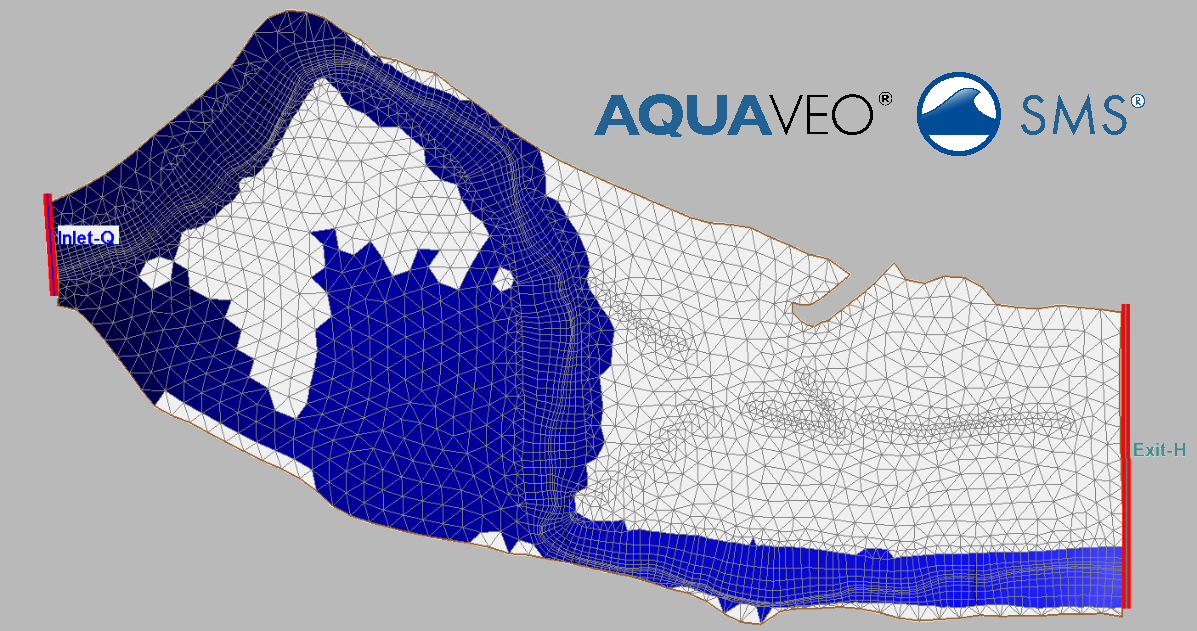
Inlet-Q (subcritical inflow): This maps directly to "Flow Hydrograph" or "Constant Flow".
-
Inlet-SC (supercritical inflow): Used when flow entering the domain is already in a supercritical state.
Flow Hydrograph
A flow hydrograph specifies discharge over time and is one of the most common inflow types.
Best Use Cases
-
Flood routing studies
-
Storm event simulations
-
Dam break or unsteady flow modeling
Common Problems
-
Unrealistically large discharges can cause instability
-
Sharp spikes in the hydrograph may create oscillations
-
Incorrect units (cms vs cfs) can dramatically distort results
Always review hydrograph timing and magnitude before running the model.
Constant Flow
A constant flow boundary applies a steady discharge throughout the simulation.
Best Use Cases
-
Steady-state studies
-
Initial condition development
-
Screening-level hydraulic analysis
Common Problems
-
Using constant flow in highly dynamic systems may produce unrealistic water levels
-
Flow values inconsistent with downstream conditions can create excessive backwater effects
Common Outflow Boundary Types
These include the types:
-
Exit-H (subcritical outflow): This corresponds to "Water Surface Elevation (Stage)".
-
Exit-Q (known-Q outflow): Used when the specific discharge leaving the domain is known (less common than Exit-H, but useful for specific calibrations or diversion structures).
-
Exit-EX (supercritical outflow): Used when water freely exits the domain without downstream backwater effects (similar to aspects of a Normal Depth boundary).
Water Surface Elevation (Stage)
A stage boundary defines the downstream water surface elevation.
Best Use Cases
-
River systems with known downstream stages
-
Coastal or tidal systems
-
Calibration against observed water levels
Common Problems
-
Setting the stage too low may artificially increase velocities
-
Setting the stage too high can flood the domain unrealistically
-
Sudden stage changes can destabilize the model
Normal Depth Boundary
A normal depth boundary estimates outflow conditions based on channel slope and roughness.
Best Use Cases
-
Long uniform channels
-
Situations where downstream stage data is unavailable
Common Problems
-
Incorrect slope values can create unrealistic water surface profiles
-
Not appropriate in backwater-dominated systems
Best Practices for Stable SRH-2D Models
-
Place boundaries away from areas of interest whenever possible
-
Verify units for discharge, stage, and elevation values
-
Smooth hydrographs to reduce numerical instability
-
Review velocity vectors and water surface contours after simulation
-
Use mesh refinement near inflow or outflow boundaries if strong gradients exist
Conclusion
Choosing the correct inflow and outflow boundary conditions in SRH-2D is essential for creating reliable hydraulic simulations in SMS. By matching boundary condition types to real-world conditions and avoiding common setup mistakes, modelers can improve stability, accuracy, and confidence in their results.
Make use of SRH-2D inflow and outflow boundaries by downloading SMS today!
June 30, 2026
|
View: 1129
|
Categories: SMS
|
By: <a class="mp-info" href="https://aquaveo.com/blog/author/admin">Aquaveo Staff</a>
About the Author


Converting a NET File to an INP File
May 9, 2018
Performing a Silent Install of XMS (Passwords & Hardware Locks)
October 10, 2018
Computing Basin Curve Numbers in 9 Easy Steps
May 16, 2023
Performing a Silent Install for ALS
October 27, 2021
Tips for Finding Information on the XMS Wiki
September 25, 2019
Meet the New Display Panel
October 13, 2026
What’s New in the GMS 11.0 Beta
October 6, 2026
Simplify and Prepare Complex Geometry
September 29, 2026
Unlock SMS 14.0 Map Undo Features
September 22, 2026
Advanced Groundwater Modeling Techniques for 3D Data
September 15, 2026