We use cookies to make your experience better. To comply with the new e-Privacy directive, we need to ask for your consent to set the cookies. Learn more.


Essential Wind Forcing in CMS-Wave
Wind is one of the primary forces driving coastal wave generation and transformation. Whether you're evaluating beach erosion, navigation channels, breakwaters, or coastal resilience, incorporating realistic wind conditions into your wave model can significantly improve the accuracy of your analysis. The Surface-water Modeling System (SMS) provides a comprehensive interface for CMS-Wave, allowing engineers and scientists to build, configure, and visualize wind-driven wave simulations from a single environment.
One important input for many CMS-Wave applications is wind forcing, which allows the model to account for waves generated or modified by local wind conditions.
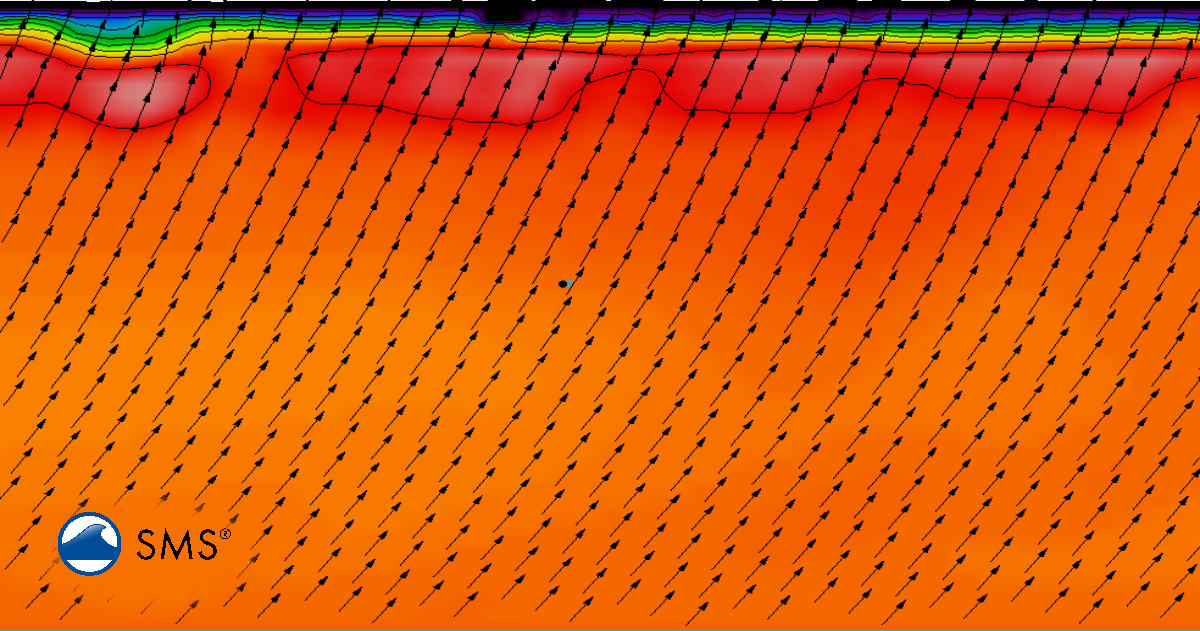
General Workflow for Wind Forcing in SMS
Although every project is unique, most CMS-Wave projects that include wind forcing follow a similar workflow.
1. Prepare the Computational Domain
Begin by creating or importing the computational grid and bathymetry. Accurate elevation data is essential because underwater topography strongly influences how waves propagate, refract, and dissipate.
During this stage, it is also helpful to verify shoreline geometry and confirm that the computational domain extends far enough offshore to capture incoming wave conditions.
2. Configure the CMS-Wave Simulation
Once the grid has been prepared, create a CMS-Wave simulation in SMS and define the model settings. This includes selecting simulation options, specifying wave parameters, and configuring the simulation period.
3. Define Wind Forcing
Wind forcing is then added to the simulation by specifying wind direction and speed information over the desired simulation period. Depending on the study, this may represent:
-
A constant design wind
-
Time-varying wind records
-
Storm-event wind conditions
To add wind forcing in the SMS interface, right-click on the CMS-Wave simulation in the Project Explorer and select 'Model Control' to open the configuration menu. Within the CMS-Wave Model Control dialog, locate and select the 'Wind' tab. From here, you can toggle the 'Include wind' setting to enable the feature, allowing you to then select your preferred wind data source, input constants, or upload time-varying records, and specify any necessary wind parameters required for your specific simulation period.
These wind inputs allow CMS-Wave to simulate locally generated waves in addition to incoming offshore wave energy.
4. Specify Additional Boundary Conditions
In addition to wind forcing, most simulations require wave boundary conditions along the open boundaries of the computational domain. These conditions define incoming wave characteristics such as wave height, period, and direction.
Combining offshore wave conditions with wind forcing provides a more complete representation of coastal processes.
5. Run and Review Results
After the simulation completes, SMS offers numerous visualization tools for reviewing results, including:
-
Wave height contours
-
Wave direction vectors
-
Wave period distributions
-
Spatial wave energy patterns
Animations can also help illustrate how wave conditions evolve throughout the simulation, making it easier to identify areas affected by wave focusing, sheltering, or energy dissipation.
Best Practices
To obtain meaningful results when using wind forcing with CMS-Wave:
-
Use high-quality bathymetric data that accurately represents coastal features.
-
Select wind data that reflects the objectives of the study, whether using observed records or design-event conditions.
-
Ensure the computational domain is large enough so boundary effects do not influence the area of interest.
-
Compare simulated wave patterns with available observations or engineering expectations whenever possible.
-
Review wave heights and directions throughout the domain to verify that results remain physically realistic.
Conclusion
Wind forcing is an important component of many coastal modeling studies, and SMS provides an intuitive interface for incorporating it into CMS-Wave simulations. By following a structured workflow—from preparing the computational grid to defining wind inputs and reviewing results—users can efficiently build models that better represent real-world coastal conditions. Whether evaluating shoreline protection projects, navigation improvements, or storm impacts, combining CMS-Wave with SMS offers a powerful environment for coastal wave analysis.
Download SMS today and get started with CMS-Wave!
August 11, 2026
|
View: 1208
|
Categories: SMS
|
By: <a class="mp-info" href="https://aquaveo.com/blog/author/admin">Aquaveo Staff</a>
About the Author


Converting a NET File to an INP File
May 9, 2018
Performing a Silent Install of XMS (Passwords & Hardware Locks)
October 10, 2018
Computing Basin Curve Numbers in 9 Easy Steps
May 16, 2023
Performing a Silent Install for ALS
October 27, 2021
Tips for Finding Information on the XMS Wiki
September 25, 2019
Save Time Selecting Polygon Arcs with SMS 14.0
November 3, 2026
Smart Guide to MT3D vs MODPATH
October 27, 2026
How to Calibrate a HEC-HMS Model for Peak Flow Accuracy
October 20, 2026
Meet the New Display Panel
October 13, 2026
What’s New in the GMS 11.0 Beta
October 6, 2026