We use cookies to make your experience better. To comply with the new e-Privacy directive, we need to ask for your consent to set the cookies. Learn more.


New Display Enhancements in GMS 10.9
Efficient visualization is essential when working with large MODFLOW simulations, detailed rasters, and presentation-quality groundwater modeling figures. With GMS 10.9, several new Graphics Window enhancements improve how users interact with model data, control display settings, and preserve workspace layouts.
These updates help make the Groundwater Modeling System (GMS) more efficient for day-to-day modeling workflows.
Linear Contours on Rasters
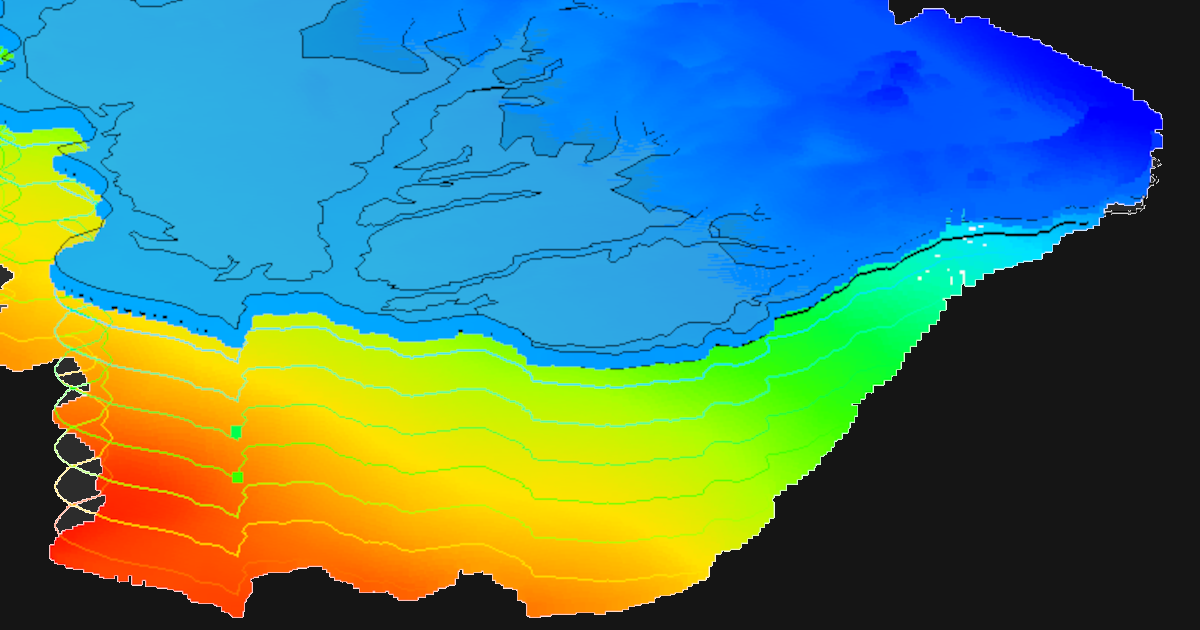
One of the most useful visualization additions in GMS 10.9 is support for linear contours on rasters.Previously, contours generated from raster datasets could appear smoothed or interpolated in ways that obscured subtle transitions. Linear contours provide a cleaner and more direct representation of raster values.
This is especially helpful for:
-
Hydraulic head rasters
-
Elevation datasets
-
Recharge distributions
-
Contaminant concentration maps
For hydrogeologists working with high-resolution DEMs or groundwater surfaces, linear contours can improve readability and produce figures that better reflect the underlying dataset.
New “Set Graphics Window Size” Command
GMS 10.9 now includes a new command located at:
Display | Set Graphics Window Size
This feature allows users to manually define the exact dimensions of the Graphics Window. Similar functionality was previously introduced in SMS to improve visualization workflows and figure generation.
This enhancement is particularly useful for:
-
Creating publication-quality screenshots
-
Standardizing figure dimensions for reports
-
Optimizing layouts for multiple monitors
-
Maintaining consistent aspect ratios between projects
Instead of manually resizing windows every session, users can now define precise dimensions directly within GMS.
Graphics Window Size Saved with the Project
Another major improvement is that the graphics window size is now saved and restored with the project file. When reopening a project, GMS restores the previous graphics window dimensions automatically.
This creates a more consistent workflow, especially for:
-
Collaborative projects
-
Long-term model development
-
Repeatable report generation
It also reduces the need to constantly readjust the interface when switching between projects.
Graphics Window No Longer Resizes Automatically
In earlier workflows, resizing the main GMS window often caused the Graphics Window to expand to full size automatically. In GMS 10.9, the Graphics Window now maintains its defined dimensions even when the main application window changes size.
This gives users more control over their workspace and prevents disruptions while editing models or preparing visual outputs.
Final Thoughts
The new Graphics Window enhancements in GMS 10.9 improve both usability and visualization quality. Features like linear raster contours, customizable Graphics Window sizing, and persistent window layouts help streamline groundwater modeling workflows and create more professional outputs. Download GMS 10.9 today!
June 2, 2026
|
View: 1243
|
Categories: GMS
|
By: <a class="mp-info" href="https://aquaveo.com/blog/author/admin">Aquaveo Staff</a>
About the Author


Converting a NET File to an INP File
May 9, 2018
Performing a Silent Install of XMS (Passwords & Hardware Locks)
October 10, 2018
Computing Basin Curve Numbers in 9 Easy Steps
May 16, 2023
Performing a Silent Install for ALS
October 27, 2021
Tips for Finding Information on the XMS Wiki
September 25, 2019
How to Calibrate a HEC-HMS Model for Peak Flow Accuracy
October 20, 2026
Meet the New Display Panel
October 13, 2026
What’s New in the GMS 11.0 Beta
October 6, 2026
Simplify and Prepare Complex Geometry
September 29, 2026
Unlock SMS 14.0 Map Undo Features
September 22, 2026