We use cookies to make your experience better. To comply with the new e-Privacy directive, we need to ask for your consent to set the cookies. Learn more.


SRH-2D Materials: Best Practices
Accurately representing surface roughness is essential for producing realistic hydraulic simulations. In Surface-water Modeling System (SMS), SRH-2D materials define Manning's roughness values and other material properties that influence how water flows through channels, floodplains, wetlands, and developed areas. While assigning materials may seem like a straightforward task, taking advantage of the SRH-2D Materials Coverage can save time, simplify model maintenance, and improve model accuracy.
Here are several tips and best practices to help you get the most from SRH-2D materials in SMS.
Start with the SRH-2D Materials Coverage
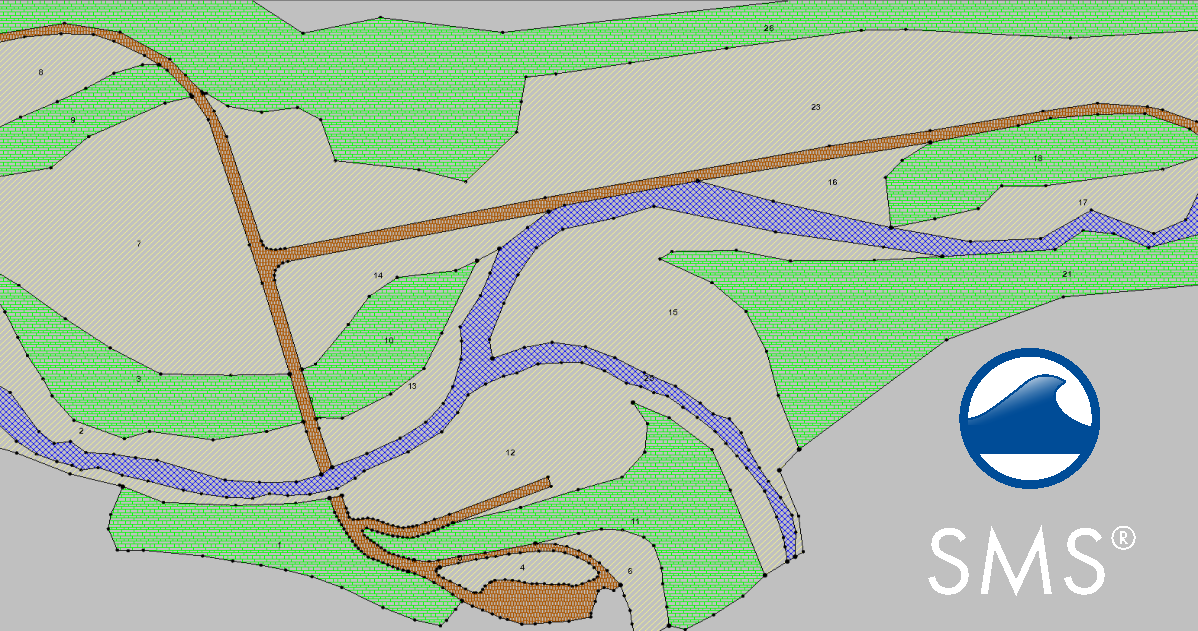
Rather than assigning material properties directly to mesh elements, SMS encourages users to begin with an SRH-2D Materials Coverage in the Map Module. This conceptual modeling approach allows you to define material zones using polygons before generating or updating the computational mesh.
Once the coverage is associated with an SRH-2D simulation, SMS maps the material properties onto the mesh during model export. This means you can revise material boundaries, regenerate the mesh, and remap materials without manually editing thousands of mesh elements.
For projects that evolve over time, this workflow is far more efficient and easier to maintain.
Use Polygons to Define Material Zones
The Materials Coverage uses polygons to represent areas with similar hydraulic characteristics. Instead of creating many small polygons, group regions that share similar land cover or roughness values.
Typical material zones include:
-
Main river channels
-
Floodplains
-
Wetlands
-
Agricultural land
-
Urban development
-
Forested areas
Using larger, well-defined polygons keeps projects organized while still capturing important hydraulic differences.
Speed Up Material Assignment
For large projects, manually assigning materials one polygon at a time can become tedious. SMS includes several tools that make the process more efficient.
If land cover information already exists as GIS data, you can use it to help define material polygons instead of redrawing boundaries manually. Recent versions of SMS also support using an NLCD (National Land Cover Database) coverage to specify spatially variable roughness for SRH-2D models. This can dramatically reduce setup time while providing a more detailed representation of surface conditions.
When working manually, organize similar polygons together so multiple areas can be assigned the same material properties in fewer steps.
Pay Attention to Material Boundaries
Material boundaries should generally follow natural transitions in land cover or hydraulic conditions rather than arbitrary lines.
For example:
-
Follow river banks when separating channel and floodplain materials.
-
Align polygons with levees or embankments.
-
Match vegetation boundaries whenever practical.
Poorly placed material boundaries can create abrupt changes in roughness that may introduce unrealistic flow behavior.
Review Your Materials Before Running
Before exporting the simulation, take time to inspect the Materials Coverage.
Check for:
-
Missing polygons
-
Overlapping material zones
-
Incorrect Manning's n values
-
Gaps between adjacent polygons
-
Material assignments that do not match aerial imagery or topography
Using SMS display options to visualize the Materials Coverage helps identify mistakes before they affect the simulation.
Take Advantage of the Conceptual Workflow
One of the biggest advantages of the Materials Coverage is flexibility. If project conditions change, you can modify polygons, adjust roughness values, or add new material zones without rebuilding the entire model.
Because materials are stored conceptually rather than directly on the mesh, the workflow remains efficient even after multiple design revisions.
Conclusion
The SRH-2D Materials Coverage is one of the most powerful productivity tools in SMS. By defining materials conceptually, organizing polygons thoughtfully, and reviewing assignments before export, you can build models that are easier to maintain and more representative of real-world conditions. Investing a little extra time in your materials setup often leads to more reliable simulations and a smoother modeling workflow.
Make use of the SRH-2D Materials Coverage and download SMS today!
August 18, 2026
|
View: 754
|
Categories: SMS
|
By: <a class="mp-info" href="https://aquaveo.com/blog/author/admin">Aquaveo Staff</a>
About the Author


Converting a NET File to an INP File
May 9, 2018
Performing a Silent Install of XMS (Passwords & Hardware Locks)
October 10, 2018
Computing Basin Curve Numbers in 9 Easy Steps
May 16, 2023
Performing a Silent Install for ALS
October 27, 2021
Tips for Finding Information on the XMS Wiki
September 25, 2019
Meet the New Display Panel
October 13, 2026
What’s New in the GMS 11.0 Beta
October 6, 2026
Simplify and Prepare Complex Geometry
September 29, 2026
Unlock SMS 14.0 Map Undo Features
September 22, 2026
Advanced Groundwater Modeling Techniques for 3D Data
September 15, 2026