We use cookies to make your experience better. To comply with the new e-Privacy directive, we need to ask for your consent to set the cookies. Learn more.


Optimize SRH-2D Start, End, & Time Settings
Setting the simulation period is one of the first steps when configuring an SRH-2D model in the Surface-water Modeling System (SMS), but it is only part of the equation. Equally important is selecting an appropriate time step, which determines how frequently the model calculates changes in flow conditions. Together, the simulation start time, end time, and time step have a direct impact on model stability, accuracy, runtime, and output quality.
Understanding how these settings work together can help you build more reliable hydraulic models while avoiding unnecessary computation or numerical instability.
Defining the Simulation Period
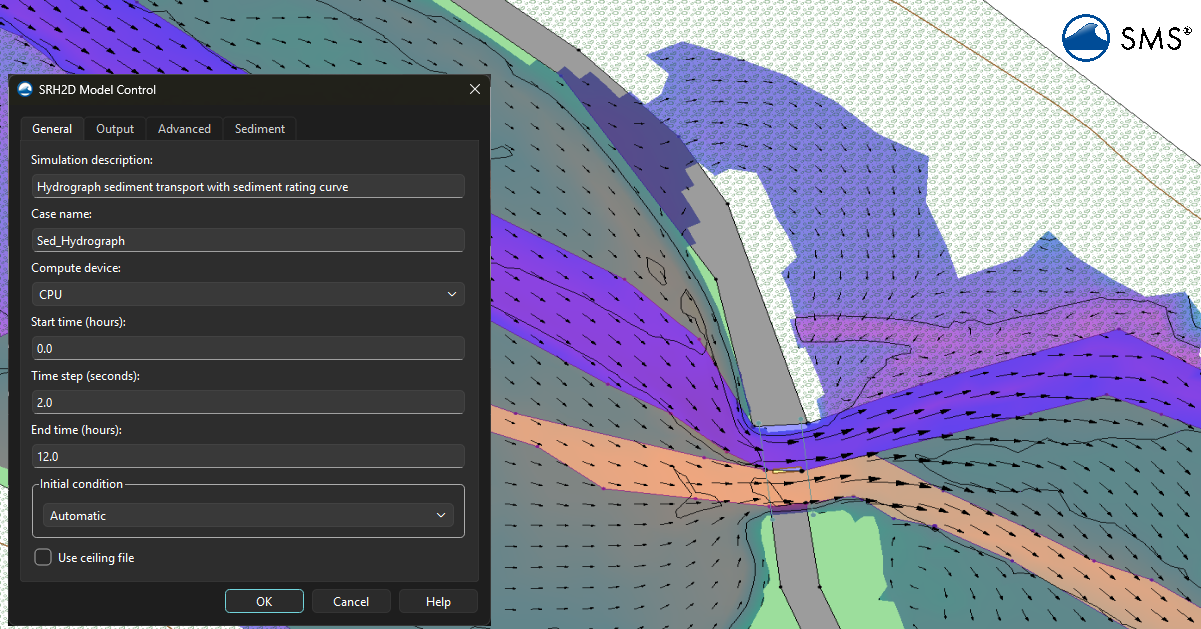
In SMS, the simulation duration is configured in the SRH-2D Model Control dialog. The Start Time specifies when the simulation begins, while the End Time determines when the solver stops.
These settings should be based on the hydraulic event you are modeling. For a steady-state analysis, the simulation only needs to run long enough for the model to reach equilibrium. For an unsteady flood simulation, however, the simulation should include the complete hydrograph—from the initial rise in flow through the peak discharge and the recession of the flood.
Whenever possible, begin the simulation slightly before the primary event begins. This allows the model to establish realistic hydraulic conditions before the most critical portion of the simulation occurs. Likewise, extending the simulation slightly beyond the end of the event allows water levels and velocities to stabilize before the model stops.
Understanding the Time Step
The time step controls how often SRH-2D updates the hydraulic solution during the simulation. Every time step represents one computational increment in which the model calculates new water depths, velocities, and water surface elevations.
In general:
-
Smaller time steps increase solution accuracy and improve numerical stability but require more computation time.
-
Larger time steps reduce runtime but may decrease accuracy or even cause the simulation to become unstable.
Think of the time step like frames in a video. A video recorded at many frames per second appears smooth because changes are captured frequently. A video with very few frames can appear jerky and miss important motion. Similarly, a hydraulic model with a very large time step may overlook rapid changes in flow or produce unrealistic oscillations.
Choosing an Appropriate Time Step
There is no single "correct" time step for every SRH-2D model. Instead, it depends on several characteristics of your project, including:
-
Mesh resolution
-
Flow velocity
-
Channel geometry
-
Terrain complexity
-
Hydraulic structures
-
Rate of change in boundary conditions
As a general guideline, finer meshes usually require smaller time steps. Small elements allow water to move through the computational domain more quickly from one cell to the next, meaning the solver must update the solution more frequently to remain stable.
Similarly, simulations with rapidly changing hydrographs or high-velocity flows often benefit from shorter time steps than steady, slow-moving systems.
A good practice is to begin with a conservative (smaller) time step and increase it gradually only after verifying that the model remains stable.
Watch for Signs of an Incorrect Time Step
Choosing an inappropriate time step can lead to several problems.
A time step that is too large may produce:
-
Oscillating water surface elevations
-
Sudden spikes in velocity
-
Checkerboard contour patterns
-
Wetting and drying cells that repeatedly turn on and off
-
Solver warnings or simulation failure
Conversely, a time step that is too small may greatly increase simulation time without producing meaningful improvements in accuracy.
If your model requires an extremely small time step to remain stable, it may indicate another issue, such as poor mesh quality, abrupt elevation changes, or unrealistic boundary conditions.
Make Sure Time Settings Work Together
The simulation period and time step should always be considered together. A longer simulation naturally requires more computational steps. For example:
-
A 2-hour simulation with a 10-second time step requires approximately 720 solution steps.
-
The same simulation using a 1-second time step requires 7,200 solution steps.
While the smaller time step may improve accuracy, it also increases computation time by a factor of ten. The goal is to select the largest stable time step that still captures the hydraulic processes important to your study.
Also ensure that your simulation period aligns with any time-varying boundary conditions, such as inflow hydrographs or stage data. The simulation should fully encompass the available input data.
Review Results After Every Simulation
After each run, use SMS visualization tools to animate water surface elevations, flood depths, and velocity vectors. Time-series plots at observation points are especially helpful for identifying oscillations, abrupt changes, or missing portions of a hydrograph.
If instability appears, consider reducing the time step before making larger changes to the model. If the model is stable but takes longer than necessary to run, experiment with slightly larger time steps while monitoring the quality of the results.
Conclusion
The simulation start time, end time, and time step are closely connected and should be considered together when configuring an SRH-2D model in SMS. Choosing a simulation period that captures the complete hydraulic event, along with a time step that balances stability, accuracy, and computational efficiency, will help produce reliable results while minimizing unnecessary runtime. Spending a few extra minutes reviewing these settings before each simulation can save hours of troubleshooting later and lead to more confident modeling outcomes.
Make use of SRH-2D with SMS today!
September 1, 2026
|
View: 902
|
Categories: SMS
|
By: <a class="mp-info" href="https://aquaveo.com/blog/author/admin">Aquaveo Staff</a>
About the Author


Converting a NET File to an INP File
May 9, 2018
Performing a Silent Install of XMS (Passwords & Hardware Locks)
October 10, 2018
Computing Basin Curve Numbers in 9 Easy Steps
May 16, 2023
Performing a Silent Install for ALS
October 27, 2021
Tips for Finding Information on the XMS Wiki
September 25, 2019
Save Time Selecting Polygon Arcs with SMS 14.0
November 3, 2026
Smart Guide to MT3D vs MODPATH
October 27, 2026
How to Calibrate a HEC-HMS Model for Peak Flow Accuracy
October 20, 2026
Meet the New Display Panel
October 13, 2026
What’s New in the GMS 11.0 Beta
October 6, 2026