We use cookies to make your experience better. To comply with the new e-Privacy directive, we need to ask for your consent to set the cookies. Learn more.


Meet the New Display Panel
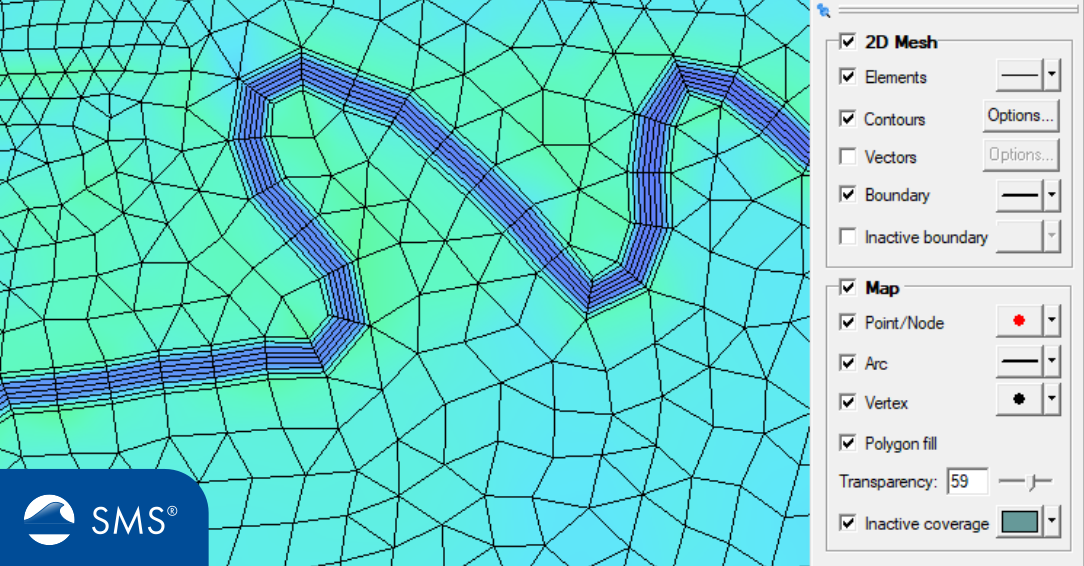
Visualizing a surface-water model often requires more than simply viewing the geometry. During model development, users regularly switch between mesh edges, nodes, contours, polygons, datasets, vectors, and other display settings to inspect different aspects of a project. In previous versions of the Surface-water Modeling System (SMS), changing many of these settings could require opening the Display Options dialog. SMS 14.0 introduces a new Display panel that puts commonly used Map and 2D Mesh display options much closer at hand.
The new panel is designed to make everyday model visualization faster and more convenient, particularly when reviewing geometry, checking a mesh, or preparing model results for analysis.
A New Home for Display Options
The Display panel is located on the right side of the SMS layout. It provides access to display options for both the Map module and 2D Mesh.
Instead of repeatedly navigating through menus or opening a separate dialog, users can make many common visualization changes directly from the panel. This can be especially useful when moving back and forth between different views of a project during model development.
For example, a modeler might want to temporarily turn on feature objects in the Map module to inspect a boundary, then switch to a 2D mesh view to examine element edges or contours. Having display controls readily accessible reduces the number of steps required for these routine changes.
Collapse It When You Need More Space
The Display panel is designed to adapt to different workflows. Users can collapse or expand the panel depending on how much screen space they need.
When actively working with display settings, keeping the panel expanded provides quick access to the available controls. When focusing on the model view itself, collapsing the panel provides additional workspace without requiring the user to close the entire panel permanently.
This is particularly helpful when working with large meshes or detailed project geometry where screen space is valuable.
Detach the Display Panel as a Floating Pane
SMS 14.0 also allows the Display panel to be detached as a floating pane. This gives users another way to arrange their workspace according to their preferences.
A floating display pane can be useful when working with multiple monitors or when the right side of the standard SMS layout is already being used for other project information. Users can position the display controls where they are most convenient while keeping the model view accessible.
Faster Model Review
The real benefit of the new Display panel is speed. Display settings are an important part of model review, not simply a presentation feature.
For example, when reviewing a 2D mesh, users may want to examine element edges, nodes, boundaries, contours, or other visualization options. Existing SMS tools provide extensive control over 2D mesh visualization, including options for displaying nodes, element edges, element faces, mesh boundaries, scalar values, and contours.
Likewise, Map display settings can help users inspect the feature objects that form the conceptual foundation of their models. SMS workflows commonly use Map module features before converting them into computational geometry such as meshes.
A Small Change with a Big Workflow Benefit
The Display panel does not change the underlying model data—it changes how users interact with and view that data. That distinction is important. Modelers can quickly change what is visible while leaving their mesh, grid, coverages, and datasets unchanged.
This makes the panel particularly useful during quality-control workflows. A modeler can quickly switch displays to investigate geometry, inspect mesh quality, review results, and then return to a preferred visualization without interrupting the modeling process.
Conclusion
The new Display panel in SMS 14.0 is a practical workflow enhancement designed to make model visualization more efficient. With Map and 2D Mesh display options available directly on the right side of the SMS interface, users can spend less time navigating menus and more time examining their models.
The ability to expand, collapse, or detach the panel as a floating pane also gives users flexibility in organizing their SMS workspace. For anyone who frequently changes display settings while developing or reviewing models, the new Display panel is a simple addition that can make everyday work noticeably faster.
Try out the new Display panel and download SMS 14.0 today!
October 13, 2026
|
View: 558
|
Categories: SMS
|
By: <a class="mp-info" href="https://aquaveo.com/blog/author/admin">Aquaveo Staff</a>
About the Author


Converting a NET File to an INP File
May 9, 2018
Performing a Silent Install of XMS (Passwords & Hardware Locks)
October 10, 2018
Computing Basin Curve Numbers in 9 Easy Steps
May 16, 2023
Performing a Silent Install for ALS
October 27, 2021
Tips for Finding Information on the XMS Wiki
September 25, 2019
Smart Guide to MT3D vs MODPATH
October 27, 2026
How to Calibrate a HEC-HMS Model for Peak Flow Accuracy
October 20, 2026
Meet the New Display Panel
October 13, 2026
What’s New in the GMS 11.0 Beta
October 6, 2026
Simplify and Prepare Complex Geometry
September 29, 2026