We use cookies to make your experience better. To comply with the new e-Privacy directive, we need to ask for your consent to set the cookies. Learn more.


Managing MODFLOW 6 Data: Lists, Copy Period & CSVs
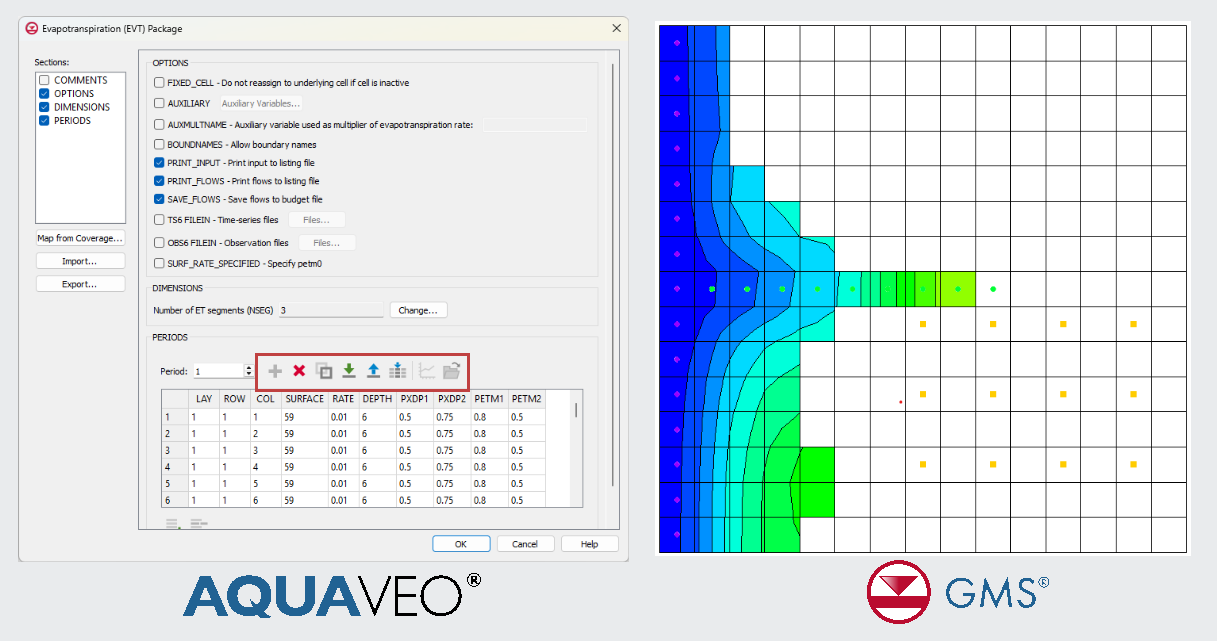
Building complex, transient groundwater models shouldn’t mean drowning in repetitive data entry. If you've ever spent hours manually updating stress periods or fighting with massive array datasets, the Groundwater Modeling System (GMS) offers a better way. While the Copy Period button is a long-standing, time-saving feature in GMS for older MODFLOW versions, its new integration with expanded MODFLOW 6 list-based packages, alongside seamless CSV support, now eliminates the tedious grunt work for the newest models. Here is how these features can help you minimize errors, handle massive datasets with ease, and get back to actual modeling.
What Are MODFLOW 6 List-Based Packages?
MODFLOW 6 continues to utilize list-based inputs for standard features like wells and rivers, but it takes data management a step further by introducing list-based options for areal stresses like Recharge and Evapotranspiration. Instead of managing massive arrays across your entire grid, data is stored simply as lists of active cell locations and their associated values.
In GMS, list-based packages offer:
-
Flexible assignment of boundary conditions
-
Easier editing of time-varying data
-
Efficient handling of sparse datasets
This structure is especially useful for models with numerous wells or transient stresses, where conditions change frequently over time.
Save Time with the Copy Period Button
One of the most useful workflow enhancements in GMS is the Copy Period button. This feature allows you to:
-
Copy all boundary condition data from one stress period to others
-
Quickly define or undefine stress periods
-
Reduce repetitive manual entry for transient models
For example, if pumping rates remain constant over several stress periods, you can define them once and copy them across the entire simulation. This not only saves time but also ensures consistency throughout the model.
Import and Export Data with CSV
GMS also supports importing and exporting MODFLOW 6 list-based data using CSV files, making it easier to work with external datasets.
Benefits of CSV workflows include:
-
Editing large datasets in Excel or other tools
-
Importing field data (e.g., pumping schedules, recharge rates)
-
Sharing model inputs with team members or stakeholders
You can quickly import well data, boundary conditions, or time-series values, then export results or inputs for documentation and reporting.
Final Thoughts
With list-based packages, the Copy Period tool, and CSV import/export, GMS makes MODFLOW 6 modeling more efficient and scalable. These features are especially valuable for transient simulations, large datasets, and collaborative projects.
By streamlining data management, GMS allows modelers to focus more on analysis and decision-making, rather than manual data entry.
Download GMS today and start using these features for MODFLOW 6 now.
April 21, 2026
|
View: 1832
|
Categories: GMS
|
By: <a class="mp-info" href="https://aquaveo.com/blog/author/admin">Aquaveo Staff</a>
About the Author


Converting a NET File to an INP File
May 9, 2018
Performing a Silent Install of XMS (Passwords & Hardware Locks)
October 10, 2018
Computing Basin Curve Numbers in 9 Easy Steps
May 16, 2023
Performing a Silent Install for ALS
October 27, 2021
Tips for Finding Information on the XMS Wiki
September 25, 2019
Simplify and Prepare Complex Geometry
September 29, 2026
Unlock SMS 14.0 Map Undo Features
September 22, 2026
Advanced Groundwater Modeling Techniques for 3D Data
September 15, 2026
Best Practices and Tips for Using SWMM with WMS
September 8, 2026
Optimize SRH-2D Start, End, & Time Settings
September 1, 2026