We use cookies to make your experience better. To comply with the new e-Privacy directive, we need to ask for your consent to set the cookies. Learn more.


How to Delineate a Well Capture Zone Using MODPATH
Need to know exactly where a well's water is coming from? Whether you are protecting local drinking water or tracking potential pollution, drawing an accurate "capture zone" is a must.
The Groundwater Modeling System (GMS) makes this process incredibly visual and straightforward using MODPATH. Using the correct workflow you can map out the paths water takes underground, you can see where groundwater originates and how long it takes to reach the pump.
Using Aquaveo’s Groundwater Modeling System (GMS) with MODPATH makes this process visual, fast, and defensible. Even better, it turns complex groundwater movement into something you can clearly explain to clients and regulators.
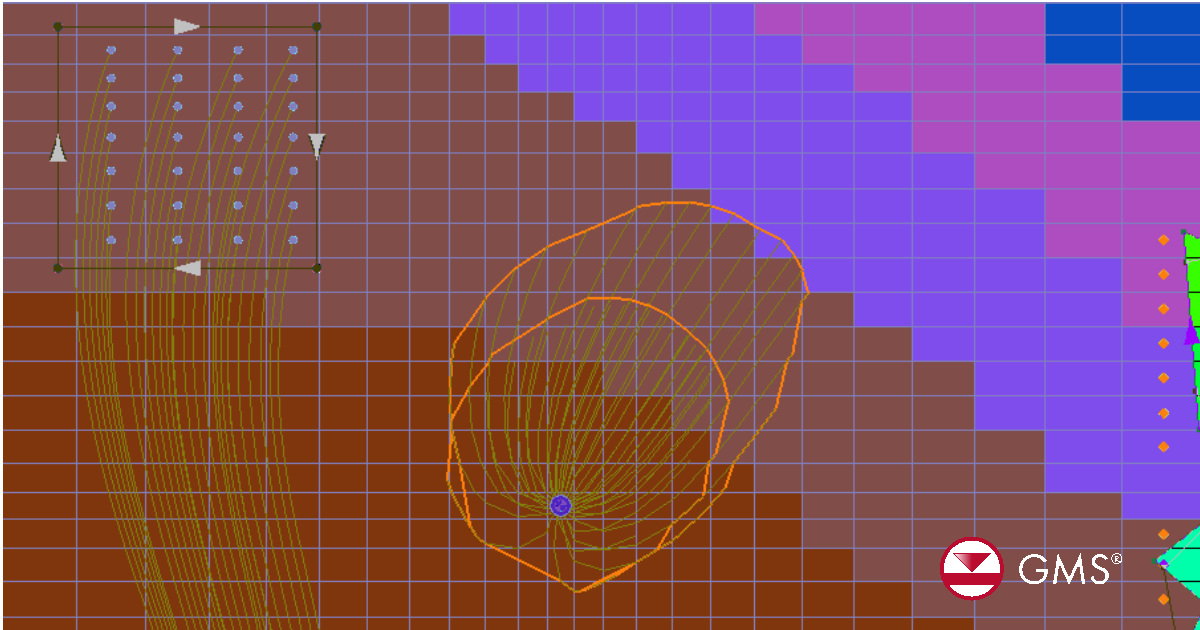
Mapping a Well Capture Zone
Here is how to map a highly accurate well capture zone in five steps.
Step 1: Start with a Solid Groundwater Model
Before you can track water, your foundation must be rock-solid. You need to build a flow model that reflects real-world conditions. Make sure your soil types, rainfall, and pumping rates are realistic. If your starting model closely matches real, observed water levels, your final capture zone will be much more reliable.
Step 2: Turn on MODPATH for Backward Tracking
Once your main model is calibrated and ready, simply enable the MODPATH feature in GMS. To map a capture zone, you will want to select "backward tracking." Think of this as a rewind button—it traces the water from the pumping well backward to the exact spot it first entered the ground. You can run this for a single, stable moment in time or track how the flow changes over months and years.
Step 3: Place Your Starting Points at the Well
Next, tell the software where to start tracking. You can drop your starting points right at the well screen. To get the most accurate picture, GMS allows you to arrange these points in a circle around the well. This helps you capture a complete, 360-degree view of how water is pulled through different layers of earth.
Step 4: Run the Model and View the Capture Zone
Hit run and watch your data come to life! GMS will draw clear, distinct lines showing the exact paths the groundwater takes. You can easily color-code these lines to highlight 1-year, 5-year, or 10-year travel times. Better yet, you can view your results from the top down, from the side, or in a full 3D view, and easily export the shapes directly into your reports.
Step 5: Review Your Results with the Big Picture
Keep in mind that MODPATH shows the average path the water travels. It is a fantastic tool for tracking flow, but it does not account for how specific chemicals might spread or dilute. Always pair these visual tracking results with your real-world project knowledge to make the smartest water management decisions.
Final Thoughts
Delineating a well capture zone helps protect drinking water, support regulatory compliance, and guide land-use decisions. With GMS and MODPATH, engineers and scientists can turn complex groundwater data into clear, actionable insight.
Want tighter integration between watershed delineation and groundwater capture zone analysis? Streamline your workflow and produce defensible results faster. Download GMS today to pair advanced groundwater modeling and MODPATH particle tracking.
March 10, 2026
|
View: 2098
|
Categories: GMS
|
By: <a class="mp-info" href="https://aquaveo.com/blog/author/admin">Aquaveo Staff</a>
About the Author


Converting a NET File to an INP File
May 9, 2018
Performing a Silent Install of XMS (Passwords & Hardware Locks)
October 10, 2018
Computing Basin Curve Numbers in 9 Easy Steps
May 16, 2023
Performing a Silent Install for ALS
October 27, 2021
Tips for Finding Information on the XMS Wiki
September 25, 2019
Simplify and Prepare Complex Geometry
September 29, 2026
Unlock SMS 14.0 Map Undo Features
September 22, 2026
Advanced Groundwater Modeling Techniques for 3D Data
September 15, 2026
Best Practices and Tips for Using SWMM with WMS
September 8, 2026
Optimize SRH-2D Start, End, & Time Settings
September 1, 2026