We use cookies to make your experience better. To comply with the new e-Privacy directive, we need to ask for your consent to set the cookies. Learn more.


Understanding Dynamic vs Static Imagery Options
Every great engineering project starts with a clear view of the terrain. When you’re working in Aquaveo’s Surface-water Modeling System (SMS), the background images you choose aren't just for decoration—they provide the essential "ground truth" for your models.
Background imagery gives your SMS project the spatial context needed to digitize channels, place structures, and check model alignment. Choosing between dynamic imagery and static images affects speed, reproducibility, and how you present results. This post breaks down the tradeoffs and offers practical guidance so you can pick the right workflow for each project stage.
Dynamic Imagery in SMS: Fast and Flexible
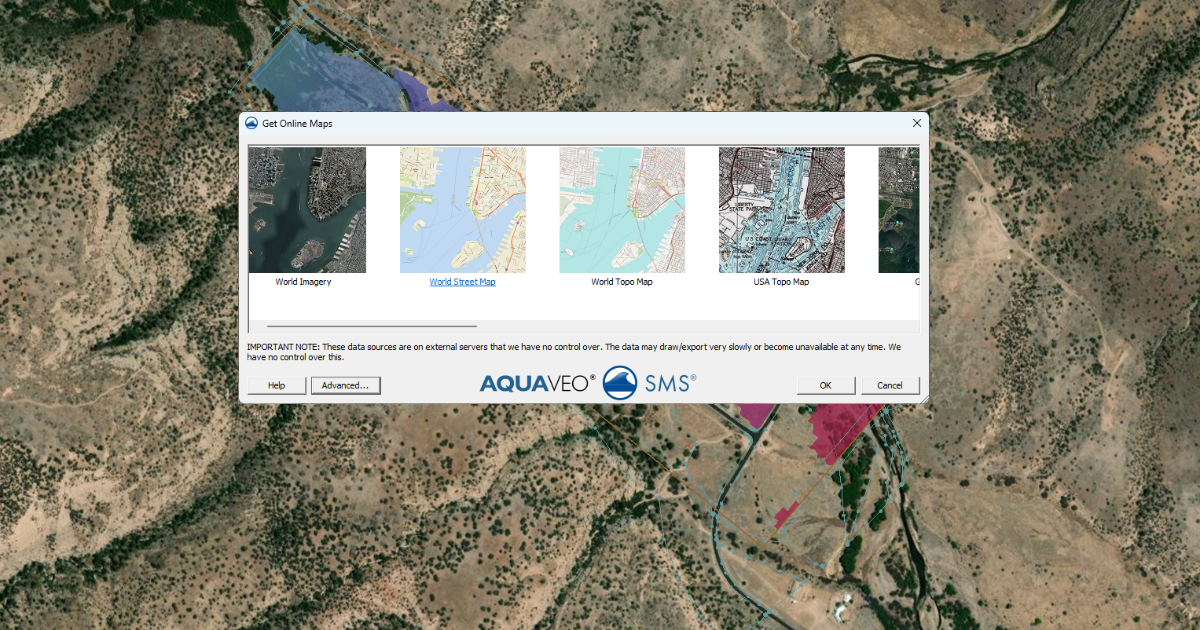
Dynamic imagery comes from online map services through the Online Maps tool. As you zoom and pan, SMS streams new map tiles from the internet and automatically adjusts the image resolution.
Benefits of Dynamic Imagery
-
Scale-aware display: The image sharpens when you zoom in and simplifies when you zoom out.
-
Strong spatial context: Great for tracing rivers, shorelines, and structures accurately.
-
Low storage needs: Images are not saved inside the project file.
-
Efficient for model setup: Ideal during early editing and quality checks.
Limitations of Dynamic Imagery
-
Internet dependent: Slow connections can cause delays or blank tiles.
-
Not time-stable: Online map providers will update their data over time, potentially changing what you see later if you are using a project over months.
-
Poor for archiving: You can’t guarantee the same imagery will be available in future reviews.
Dynamic imagery works best when you are exploring an area and building the model for the first time.
Static Images in SMS: Stable and Reliable
Static images are typically raster files such as GeoTIFFs or JPEGs imported using the Import from Web tool or imported from local storage. Once added, they never change unless you replace them.
Benefits of Static Images
-
Fully reproducible: The image stays the same for the life of the project.
-
Offline use: No internet connection needed.
-
Consistent documentation: Perfect for reports and regulatory submissions.
-
Event-specific context: Useful for historical photos or site surveys.
Limitations of Static Images
-
Fixed resolution: Images can look blurry when zoomed in too far.
-
Larger project size: Files are stored with the project.
-
Less flexible: No automatic updates or tiling.
Static images shine when accuracy and consistency matter most.
The Pro Workflow: Which One Should You Use?
Most experts don't just pick one; they use both at different stages of the project:
-
The Discovery Phase: Start with Dynamic Imagery. It’s perfect for exploring the watershed and deciding where your boundaries should go.
-
The Production Phase: Once you’ve identified your key areas, switch to Static Images.
-
The Presentation Phase: Best practice is to use static images for big meetings.This keeps unreliable internet connections from ruining your presentation!
Practical tips
-
Start with Online Maps to locate features quickly.
-
Export or import a static copy before major milestones or presentations.
-
Keep static images at the best practical resolution to reduce pixelation.
-
Document the imagery source and date in project notes for traceability.
Conclusion
Dynamic imagery and static images play different but complementary roles in SMS. Use Online Maps for fast, interactive model development and Import from Web for stable, long-term project records. Choosing the right imagery at the right stage leads to better performance, clearer visuals, and more trustworthy results.
Make use the imagery options available in SMS today!
February 3, 2026
|
View: 3039
|
Categories: SMS
|
By: <a class="mp-info" href="https://aquaveo.com/blog/author/admin">Aquaveo Staff</a>
About the Author


Converting a NET File to an INP File
May 9, 2018
Performing a Silent Install of XMS (Passwords & Hardware Locks)
October 10, 2018
Computing Basin Curve Numbers in 9 Easy Steps
May 16, 2023
Performing a Silent Install for ALS
October 27, 2021
Tips for Finding Information on the XMS Wiki
September 25, 2019
How to Calibrate a HEC-HMS Model for Peak Flow Accuracy
October 20, 2026
Meet the New Display Panel
October 13, 2026
What’s New in the GMS 11.0 Beta
October 6, 2026
Simplify and Prepare Complex Geometry
September 29, 2026
Unlock SMS 14.0 Map Undo Features
September 22, 2026