We use cookies to make your experience better. To comply with the new e-Privacy directive, we need to ask for your consent to set the cookies. Learn more.


Working with Inactive Cells in MODFLOW 6
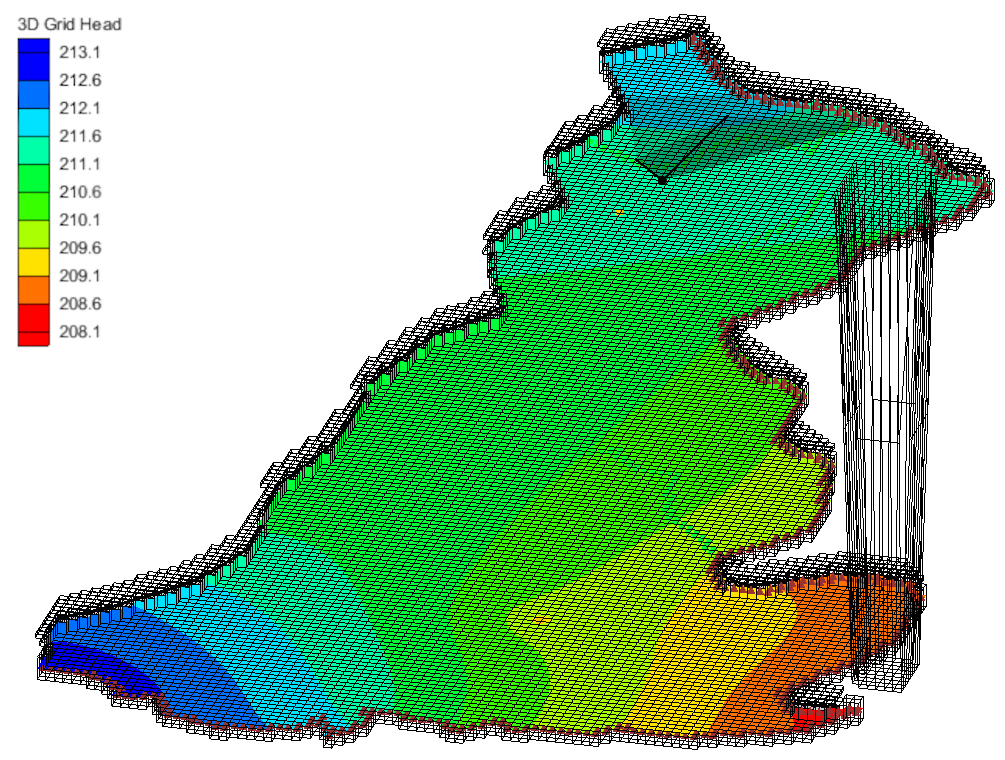
When working with a MODFLOW 6 model in the Groundwater Modeling System (GMS) it can be important to mark specific cells inside a project as inactive to keep it out of the computational domain. Using inactive cells can speed up the performance and accuracy of your model. Incorrectly designating cells as inactive or active can cause inaccuracies in your model or keep it from converging. Here is some guidance for working with inactive cells that will help create a better MODFLOW 6 model.
Why Inactive Cells Matter in MODFLOW 6
Inactive cells are commonly used to exclude regions that are outside the area of interest, such as bedrock, dry areas, or locations beyond model boundaries. When applied correctly, inactive cells:
-
Reduce the size of the computational domain
-
Improve solver performance and convergence
-
Help maintain realistic model geometry
Conversely, poorly defined inactive cells—especially those with unrealistic elevations—can negatively affect nearby active cells and compromise model results.
Understanding Cell Geometry and Elevation Effects
Before designating cells as inactive, it is important to understand how GMS and MODFLOW 6 calculate cell properties such as X, Y, Z, and S values.
In GMS, the values displayed above the graphics window for a selected cell are calculated at the cell center. MODFLOW 6 requires continuous node connectivity between adjacent cells. As a result:
-
If an inactive cell has an unrealistically low elevation,
-
Adjacent active cells will be forced to connect to it vertically,
-
This can pull down the Z-values of nearby active cells,
-
Leading to unintended grid distortion and numerical instability.
To avoid these issues, ensure that inactive cells have reasonable elevations or are positioned so they do not adversely influence active model areas.
How MODFLOW 6 Uses IDOMAIN
MODFLOW 6 uses the IDOMAIN array to determine whether a cell is active or inactive:
-
IDOMAIN = 1 → Active cell
-
IDOMAIN = 0 → Inactive cell
Cells with an IDOMAIN value of zero are excluded from the solution and do not participate in groundwater flow calculations.
How to Inactivate Cells in MODFLOW 6 Using GMS
Follow these steps to define inactive cells in a MODFLOW 6 model within GMS:
-
Open your MODFLOW 6 simulation.
-
Double-click the DIS, DISU, or DISV package to open its dialog.
-
In the GRIDDATA section, locate the IDOMAIN spreadsheet.
-
Enable the Define checkbox to display cell values.
-
Click the Activate Cells in Coverage button and select the appropriate coverage.
-
Review the populated spreadsheet.
-
Enter a value of “0” for any cell you want to mark as inactive.
These cells will now be excluded from the computational domain during simulation.
Best Practices for Using Inactive Cells
-
Avoid assigning unrealistic elevations to inactive cells near active boundaries
-
Use coverages to clearly define model extents
-
Review grid geometry after inactivating cells
-
Test model convergence after changes to IDOMAIN
Improve MODFLOW 6 Performance with Proper Cell Inactivation
When used correctly, inactive cells are a powerful tool for improving MODFLOW 6 model efficiency and accuracy. By understanding how IDOMAIN works and how cell geometry interacts across active and inactive regions, you can build more stable and reliable groundwater models in GMS.
Making use of inactive cells can improve you MODFLOW 6 model. Try out MODFLOW 6 in GMS today!
February 14, 2023
|
View: 3380
|
Categories: GMS
|
By: <a class="mp-info" href="https://aquaveo.com/blog/author/admin">Aquaveo Staff</a>
About the Author


Performing a Silent Install of XMS (Passwords & Hardware Locks)
October 10, 2018
Computing Basin Curve Numbers in 9 Easy Steps
May 16, 2023
Converting a NET File to an INP File
May 9, 2018
Performing a Silent Install for ALS
October 27, 2021
Tips for Finding Information on the XMS Wiki
September 25, 2019
Tips for Modeling Bridge Scour
May 19, 2026
Essential Guide to WMS Rain-on-Grid Modeling
May 5, 2026
Best Practices for Modeling Complex Geometries
April 28, 2026
Managing MODFLOW 6 Data: Lists, Copy Period & CSVs
April 21, 2026